TouchPal X Keyboard Apk v5.4.6.3
TouchPal X Keyboard Apk v5.4.6.3
Requirements: Android v2.2+
Overview: TouchPal Keyboard V5, Feel the speed! The Winner of Global Mobile Innovation Award!
About TouchPal X Keyboard
HIGHLIGHTS:
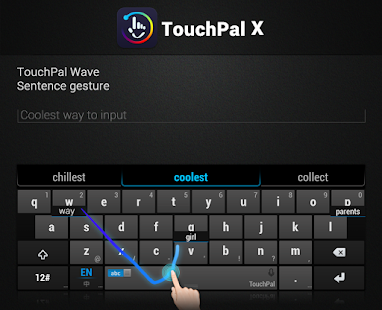
• TouchPal Wave - Sentence gesture, use the gesture to input commonly used phrases/sentences
• TouchPal Curve® - Word gesture technology
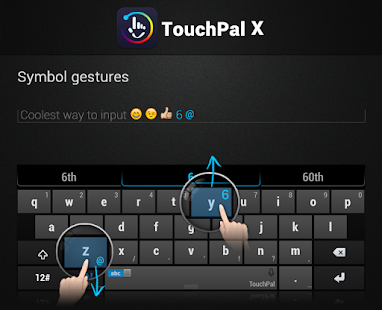
• Sliding up or down gesture to input number or symbol
• Emoji X: Flip up Space for emoji & smileys
• Contextual prediction
• Blind type on your touchscreen
• Save > 90% of keystrokes
• Learns your Tweets/messages/contacts to personalize candidate outputs
• Walkie-Talkie style voice input
• T+ dual-letter layout: bigger keys than QWERTY
Other Features:
• Support more than 70 languages
• Toolbar plugins (Twitter plugin)
• Mixed language prediction
• Keyboard meter and speed statistics tracker
• Multiple themes available
• One-hand keyboard layout for large touchscreen
Install & activate
After installation, please launch the TouchPal from app list and follow the steps to activate TouchPal X.
You may receive a warning when activating TouchPal X saying “This keyboard may collect your personal data.” We take your privacy seriously. TouchPal X does not collect your private data including password or credit card info. The warning message when you enable the keyboard is a standard message in Android for ANY third-party keyboard app. Refer to our privacy policy at http://www.touchpal.com/privacypolicy.html.
HOW TO USE TOUCHPAL WAVE - SENTENCE GESTURE
Once you start entering a word, you can use TouchPal Wave™ to tap on the first correct prediction it makes, and then drag it down to the space bar. Words will dynamically emerge out of the keys, suggesting next possible words in your sentence. You can drag your finger from word to word, eventually entering an entire sentence in a matter of seconds.
SUPPORTED LANGUAGES
English
English (UK)
English (US)
Albanian
Arabic
Basque
Bengali
Bopomofo
Bosnian (Cyrillic)
Bosnian (Latin)
Bulgarian
Burmese
Cangjie
Catalan
Chinese Handwriting
Croatian
Czech
Danish
Dutch
Estonian
Finnish
French
Galician
German
Greek
Hebrew
Hindi
Hungarian
Icelandic
Indonesian
Italian
Kazakh
Khmer
Korean
Laos
Latvian
Lithuanian
Macedonian
Malagasy
Malayan
Marathi
Norwegian
Persian
Pinyin/Bihua
Polish
Portuguese
Portuguese (Brazil)
Romanian
Russian
Serbian
Serbian (Latin)
Simple Cangjie
Slovak
Slovenian
Spanish
Spanish (Latin)
Swedish
Tagalog
Tamil
Telugu
Thai
Tibetan
Turkish
Uighur
Ukrainian
Urdu
Vietnam
Wubi
Recent changes:
What's new in 5.4.6
- Theme cutomization
- Improve Wave intelligence
- Recover the origin input when click backspace or tap on the word.
- Total free keyboard appearance adjustment.
- Classic style candiate. (Change the style in settings)
- TouchPal store: download themes, languages, and new sub dictionaries.
- Word trends. Auto update Trending words into your dictionary.
- Improve keypress vibration configuration.
- Fix vibration effect of holding backspace.
- Fix prediction bugs
DOWNLOAD HERE
https://play.google.com/store/apps/details?id=com.cootek.smartinputv5
Requirements: Android v2.2+
Overview: TouchPal Keyboard V5, Feel the speed! The Winner of Global Mobile Innovation Award!
About TouchPal X Keyboard
HIGHLIGHTS:
• TouchPal Wave - Sentence gesture, use the gesture to input commonly used phrases/sentences
• TouchPal Curve® - Word gesture technology
• Sliding up or down gesture to input number or symbol
• Emoji X: Flip up Space for emoji & smileys
• Contextual prediction
• Blind type on your touchscreen
• Save > 90% of keystrokes
• Learns your Tweets/messages/contacts to personalize candidate outputs
• Walkie-Talkie style voice input
• T+ dual-letter layout: bigger keys than QWERTY
Other Features:
• Support more than 70 languages
• Toolbar plugins (Twitter plugin)
• Mixed language prediction
• Keyboard meter and speed statistics tracker
• Multiple themes available
• One-hand keyboard layout for large touchscreen
Install & activate
After installation, please launch the TouchPal from app list and follow the steps to activate TouchPal X.
You may receive a warning when activating TouchPal X saying “This keyboard may collect your personal data.” We take your privacy seriously. TouchPal X does not collect your private data including password or credit card info. The warning message when you enable the keyboard is a standard message in Android for ANY third-party keyboard app. Refer to our privacy policy at http://www.touchpal.com/privacypolicy.html.
HOW TO USE TOUCHPAL WAVE - SENTENCE GESTURE
Once you start entering a word, you can use TouchPal Wave™ to tap on the first correct prediction it makes, and then drag it down to the space bar. Words will dynamically emerge out of the keys, suggesting next possible words in your sentence. You can drag your finger from word to word, eventually entering an entire sentence in a matter of seconds.
SUPPORTED LANGUAGES
English
English (UK)
English (US)
Albanian
Arabic
Basque
Bengali
Bopomofo
Bosnian (Cyrillic)
Bosnian (Latin)
Bulgarian
Burmese
Cangjie
Catalan
Chinese Handwriting
Croatian
Czech
Danish
Dutch
Estonian
Finnish
French
Galician
German
Greek
Hebrew
Hindi
Hungarian
Icelandic
Indonesian
Italian
Kazakh
Khmer
Korean
Laos
Latvian
Lithuanian
Macedonian
Malagasy
Malayan
Marathi
Norwegian
Persian
Pinyin/Bihua
Polish
Portuguese
Portuguese (Brazil)
Romanian
Russian
Serbian
Serbian (Latin)
Simple Cangjie
Slovak
Slovenian
Spanish
Spanish (Latin)
Swedish
Tagalog
Tamil
Telugu
Thai
Tibetan
Turkish
Uighur
Ukrainian
Urdu
Vietnam
Wubi
Recent changes:
What's new in 5.4.6
- Theme cutomization
- Improve Wave intelligence
- Recover the origin input when click backspace or tap on the word.
- Total free keyboard appearance adjustment.
- Classic style candiate. (Change the style in settings)
- TouchPal store: download themes, languages, and new sub dictionaries.
- Word trends. Auto update Trending words into your dictionary.
- Improve keypress vibration configuration.
- Fix vibration effect of holding backspace.
- Fix prediction bugs
DOWNLOAD HERE
https://play.google.com/store/apps/details?id=com.cootek.smartinputv5
Labels: Productivity
posted by Unknown @ 6:20 AM
0 Comments